Branded QR codes, without the design headache
Generic black-and-white QR codes scream "I was made in two seconds". Adding your logo turns a functional square into a piece of brand communication. QR Studio does it for free: upload your logo, pick the size, download a print-ready file. Five clicks, zero expertise required.
How to Add a Logo to Your QR Code
QR Studio automates the tricky parts: error correction, logo positioning, background padding. So you get a scannable branded code without understanding a single technical detail.
Choose your QR type and enter your data
Pick URL, Wi-Fi, vCard, or whichever type fits your use case. Fill in the content fields on the left.
Upload your logo
In the Logo / Image Overlay section, click or drag any PNG, JPG, SVG, or WebP (max 2 MB). PNG with a transparent background gives the cleanest result.
Let error correction auto-bump to H
QR Studio automatically switches error correction to H (30%) when you upload a logo. This means up to 30% of the code can be obscured and it will still scan. No manual work required.
Adjust the logo size
The default is 22% of the QR width, a good balance of visibility and scanning safety. Slide up to 30% for a bolder look, or down to 10% for a subtler mark.
Scan test the preview
Before downloading, open your phone's camera and scan the on-screen preview. If it reads correctly on your phone, it will read correctly on your customer's phone. This one check saves you from reprinting 500 flyers.
Where a Logo QR Code Earns Its Keep
Anywhere your brand needs to be recognizable at a glance, a logo QR code outperforms a generic black square.
If you want the code itself to be the design rather than a square carrying a logo, the heart-shaped QR code generator lays the entire code out as a heart, finder squares and all.
Business cards
Your logo in the centre tells the scanner this is official and on-brand, not some random generator.
Product packaging
Turns a scan-to-register code into a piece of brand communication on the package itself.
Marketing materials
Posters, flyers, brochures. The logo keeps the QR consistent with the rest of your campaign design.
Restaurant menus
Menu QR with your restaurant logo in the middle looks 10× more professional than a plain black square.
Retail & storefronts
Shop window QR code with your logo is instantly recognisable as belonging to your store.
Event signage
Conference booth QR with your logo helps visitors identify you across a crowded trade floor.
Why QR Codes Can Hold a Logo in the First Place
QR codes are built with error correction: a redundancy system that lets them scan even when partially damaged, dirty, or obscured. The standard defines four levels: L (7%), M (15%), Q (25%), and H (30%). At level H, up to 30% of the QR code's data can be covered and the code will still decode correctly.
That's the magic trick. When you overlay a logo in the centre, you're obscuring roughly 20-25% of the data area. With error correction at H, the remaining modules contain enough redundant information to reconstruct what's hidden. The code still scans, and your brand gets the middle spot.
QR Studio handles this automatically, upload a logo and error correction jumps to H without you needing to know the theory. You get a branded, scannable QR in under a minute.
Putting Your Logo in the Center of a QR Code
The logo sits in the middle of the code, on top of the modules, and the code is rebuilt around it. These are real exports from the generator on this page, not mockups. Scan any of them and it opens this page.
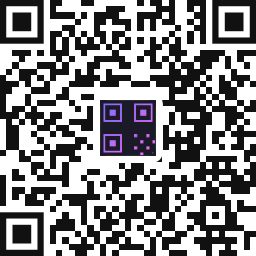
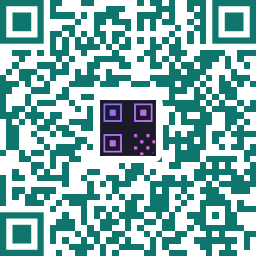
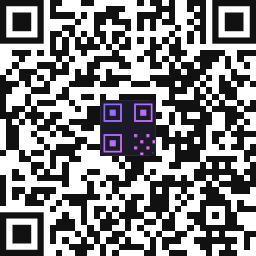
Two things decide whether a logo QR code works: how much of the code the logo covers, and whether there is enough contrast left for a camera. Everything else is taste.
How Big Can the Logo Be Before the Code Stops Scanning?
The usual advice is that error correction level H recovers about 30% of a code, so a logo covering up to 30% is safe. That is roughly right, but it hides the part that actually catches people out. We scan-tested this generator against a strict decoder, at error correction H with the white padding on, to find where each size of code gives up:
- A few words of text (a 21-module code) survived a logo up to 30% of the width, and failed at 32%.
- A short phrase (25 modules) survived to 32%, and failed at 33%.
- A short link (29 modules) survived to 34%, and failed at 35%.
- A longer URL (41 modules) survived to 38%, and failed at 40%.
Smaller codes tolerate less, not more. That is the opposite of what most people expect. The logo is a fixed share of the picture, so on a low-density code it lands on proportionally more of the finder and timing patterns, and those are the parts error correction cannot rebuild.
Because of that, the size slider on this site stops at 30%: it is the largest setting that survived every size of code we tested. For a comfortable margin, keep the logo at 25% or below, keep your link short, and leave the white padding on so the logo has a clean edge against the modules. Then scan the printed result rather than the screen, because paper is where codes fail.
Frequently Asked Questions
Yes, at error correction level H (30%). QR Studio auto-selects this the moment you upload a logo. As long as the logo covers less than ~30% of the code area, it will scan reliably on every modern phone.
PNG with a transparent background is ideal, your logo blends cleanly against the QR code's background. SVG also works well for simple vector logos. JPG and WebP are supported too but give slightly less clean results than transparent PNG.
QR Studio lets you slide from 10% to 30% of the QR width. The default is 22%, which is the industry-standard sweet spot, big enough to be recognizable, small enough to guarantee scannability.
The white pad behind your logo creates a visual separation between the brand mark and the QR modules. This dramatically helps phone cameras focus on the code structure rather than mixing the logo pixels into the QR. You can toggle it off if your logo already has a solid background, but we recommend leaving it on.
For any printed application: business cards, packaging, signage. Download SVG or EPS. These are vector formats that scale to any print size without losing sharpness. PNG is fine for digital use but blurs when printed large.
Yes. Upload any PNG, JPG, SVG or WebP up to 2 MB, and it is placed in the middle of the code. There is no account, no watermark and no limit on how many you make, and you can download the result as PNG, SVG, EPS or PDF.
Enter your link, open the Logo / Image Overlay section, and upload your image. It drops straight into the center and error correction switches to H automatically. Use the size slider to fit it, keeping it at 25% or below, then download.
Inside is the convention and it is what this generator does, because a logo beside the code reads as two separate things. If you want the code itself to carry a shape instead, the heart, circle and speech bubble options change the outline of the whole code.
25% of the code width or less. We scan-tested where each size of code fails: a 21-module code died at 32%, a 29-module short link at 35%, and a longer URL at 40%. Smaller codes tolerate less, not more, which is why the slider here stops at 30%. Shorter links leave more room.
Usually yes. The padding gives the scanner a clean boundary between your logo and the modules around it, which matters most in print. Turning it off looks tighter on screen and still scans, but it leaves less margin for a poor camera or bad lighting.
Keep reading
Related pages on QR Studio.
- we tested 248 codes to find how big a logo can beOriginal measurements, not the usual thirty-percent rule of thumb.
- which colour combinations actually survive a scan48 codes put through two decoders under real-world degradation.
- how clothing brands put codes on care labelsA branded code at the smallest size anyone prints.
- codes on retail packagingWhere a logo in the middle earns its keep commercially.
- a round code with your logoShape and logo, applied together.
Create a branded QR in under a minute
Free forever, no sign-up, no watermark. Auto-optimized for reliable scanning.
⚡ Open QR GeneratorHow big can the logo actually be?
We generated 248 QR codes and decoded every one with two independent decoders to find out exactly where a centre logo stops working - and why a small code tolerates less than a large one. Read the full test and download the data →