Round, because square does not always fit
A circle sits where a square looks wrong: on a QR code sticker, a bottle cap, a badge, a coaster, a record label, a profile picture. QR Studio lays the whole code out as a round mosaic with the scannable code held in the middle, so it reads as a design element rather than a barcode dropped into a layout.
What a Circle QR Code Actually Is
There are two different things people mean by a round QR code, and only one of them is what you get here.
- Round modules. The little squares that make up a normal code are drawn as dots. The code is still a square. That is the Dots option in the generator.
- A round code. The whole thing is a circle. That is the Circle option, and it is what this page is about.
The way it works is worth knowing, because it explains the one thing people ask. A QR code has to stay square to be readable, so the real code sits whole and untouched in the centre of the circle, surrounded by a clear quiet zone. The ring around it is a decorative fill at half density, which is what gives the circle its solid look. Nothing is cut out of the data.
Where a round code earns its place:
- QR code stickers. The best fit there is. Round die-cut stickers are a stock product at every printer, so the code and the sticker are the same shape and nothing is wasted squaring it off.
- Bottle caps, jar lids and tin tops. Circular surfaces where a square code has to be shrunk to fit inside the round area anyway.
- Badges, pins and coasters. Small round objects handed out at events.
- Record labels and disc art. The centre of a label is already a circle.
- Profile pictures and avatars. Most platforms crop to a circle, which clips the corners off a square code.
How to Make a Circle QR Code
Open the generator and enter your content
Click the button above, then paste a URL or type whatever the code should carry. The preview builds as you type.
Choose Circle under Shape
Scroll to the Shape section and pick Circle. The code redraws as a round mosaic straight away, and error correction switches to H on its own.
Set your colours
Any colour works as long as it is dark enough against the background. The contrast meter under the pickers warns you before you download something that will not scan.
Download it
PNG for screens, SVG for anything going to print. Both are free, unwatermarked and need no account.
Keeping a Round Code Reliable
The shape costs you some area, so the usual rules matter more than they would on a plain square code:
- Keep the link short. A shorter URL needs fewer modules, which means bigger modules inside the same circle. This is the single biggest thing you control.
- Print it larger. Around 2.5cm is a sensible floor for a round code held in the hand, a little more than you would need for a square one.
- Go dark. Cameras read brightness, not colour. A deep shade on a pale background is reliable; a pastel on white often is not. The contrast meter in the generator will tell you before you download.
- Do not crop the ring. The circle needs the clear space around it. Placing type right up against the edge is the most common reason a code that worked on screen fails on paper.
- Test the print, not the screen. One proof, two different phones.
What It Looks Like
This is a real export from the generator on this page, not a mockup. Scan it and it opens this page.
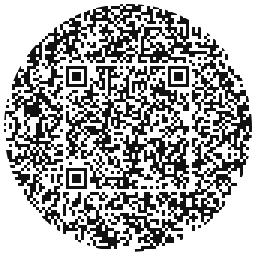
If you want a shape with more personality, the heart-shaped QR code generator works the same way, and there is a speech bubble QR code for when the code needs to ask for the scan.
Frequently Asked Questions
Yes. The scannable code sits whole in the middle of the circle with a clear quiet zone around it, and the round area outside is decorative fill. Every payload we tested, from a short link up to a 120 character URL, read first time on a normal phone camera.
Because a square cannot fill a circle. The largest square that fits inside a circle covers about 70 percent of its width, and the code is set well inside that, at around half the circle’s width, so it keeps a clear quiet zone the whole way round rather than running up to the rim. The decorative ring around it is what makes the shape read.
Rounding the outline means the code has to be smaller than a plain square one, so it is set to the highest error correction level automatically. That is the same thing the heart shape does, and it is why these shapes stay reliable.
Yes, the logo overlay works with the circle shape. Keep it small. A logo covering more than about a fifth of the code eats into the data the error correction is already spending on the shape.
Dots changes the shape of the individual squares inside a normal square code. Circle changes the outline of the whole thing. They are independent ideas and Circle is the one people mean when they search for a round QR code.
Completely. No watermark, no sign-up, no limit on how many you make, and the PNG, SVG, EPS and PDF downloads are all included.
Keep reading
Related pages on QR Studio.
- the speech-bubble shapeSame idea, different outline.
- a round code with a logo in the middleThe two customisations work together.
- how much of the middle you can coverMeasured, because a circle leaves less room than a square.
- the heart-shaped versionFor invitations rather than signage.
- the Valentine's versionSame shaped-code family, seasonal styling.