A square asks nothing. A bubble asks
The hard part of a QR code is not printing it, it is getting somebody to point a phone at it. A plain square gives a passer-by no reason to. A speech bubble is a shape people already read as someone talking, which is why posters and packaging bolt a caption onto the code in the first place. Here the shape carries that job instead of a label stuck underneath.
Why Shape the Code Like a Bubble
Every QR code competes for the same scarce thing: a second of somebody's attention and a reason to act. The usual fix is a caption, a border and an arrow around a square code. A bubble does it in the shape itself.
- It reads as speech. A tail pointing away from the body is one of the most recognisable shapes there is, and it carries an implied "this is talking to you".
- It survives being small on a page. A caption under a code disappears at a glance. An outline does not.
- It suits chat-shaped contexts. Support cards, feedback requests, community invites, anything where the destination is a conversation rather than a shop.
One honest caveat. We have no measured proof that a bubble is scanned more often than a square, and neither does anyone else selling you one. It is a reasonable bet on a well understood visual convention, not a proven conversion trick. If it matters to your campaign, print both and count.
How to Make a Speech Bubble QR Code
Open the generator and enter your content
Click the button above and paste the link the code should open. The preview builds as you type.
Choose Bubble under Shape
Scroll to the Shape section and pick Bubble. The code redraws as a speech bubble with the tail at the bottom left, and error correction switches to H automatically.
Set your colours
Dark on pale is the reliable combination. The contrast meter under the colour pickers flags anything too light before you download it.
Download it
PNG for social and screens, SVG for print. Free, no watermark, no account.
Where It Works and Where It Does Not
The shape earns its place when the code is big enough to be seen as a shape:
- Works well. QR code stickers, posters, table cards, packaging inserts, shop windows, presentation slides, social posts, support and feedback cards. Stickers suit it best of all, because a die-cut sticker can follow the outline of the bubble instead of squaring it off.
- Works badly. Anything under about 2.5cm, where the outline stops registering and you are just paying for the shape with lost area. Use a plain square there.
- Avoid. Dense layouts with no clear space. The bubble needs room around it, particularly under the tail.
As with every decorative shape, keep the link short. Fewer characters mean fewer modules, which means larger modules inside the same bubble and a code that is easier for a camera to lock on to.
Adding a Caption or "Scan Me" Text
This is the most common question about shaped codes, and the honest answer has two halves.
Text cannot go inside the bubble. The outline is drawn in modules from edge to edge, so there is no blank area to put a word in. The scannable code is a square sitting in the middle of the bubble and the rest of the outline is decorative fill, which means text across the centre will stop it scanning while text on the outer fill will not - but nothing on the finished image shows you where that boundary falls, and covering part of the outline stops the shape reading as a bubble anyway. Treat the whole shape as off limits.
Put the caption underneath, or use a framed square instead. In whatever you are designing in, set your own line of text below the bubble and leave clear space between the two. If you want the caption baked into the file rather than added in your layout, switch the shape back to Square and turn on the "SCAN ME" frame in the generator, which exports the border and the wording as part of the image.
Which one you want depends on what the code is for. A bubble already reads as something speaking, so it does some of a caption's work by itself on a sticker or a table card. A framed square says it outright, which is the safer choice on a poster read at a distance or anywhere the audience is not expecting a code at all.
What It Looks Like
A real export from the generator on this page. Scan it and it opens this page.
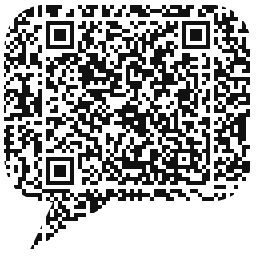
The heart-shaped QR code generator and the circle QR code generator use the same technique with different outlines.
Frequently Asked Questions
A QR code laid out in the shape of a speech bubble, tail and all, instead of a plain square. The scannable code sits inside the body of the bubble and the rest of the outline is decorative fill, so it still reads on any phone camera.
Yes. The code sits whole inside the bubble body with a clear quiet zone around it, and error correction is raised to the highest level automatically. Six exports, from a 22 character link to a 120 character URL, were each read correctly on the first attempt by two independent decoders.
Because a plain square QR code does not ask for anything. A speech bubble is a shape people already read as someone talking, which does some of the work that a printed "scan me" caption usually has to do. Whether that lifts scan rates for you is worth testing rather than taking on faith.
Down and to the left, which is the conventional direction for a bubble coming from something on the left of it. It is fixed for now.
Not inside the shape. The outline is drawn in modules from edge to edge, so there is no blank area to put a word in, and nothing on the finished image shows you which part of it is the scannable code and which is decorative fill. Set your own caption underneath it in whatever you are designing in, or use the "SCAN ME" frame option in the generator on a square code instead.
Yes. No watermark, no sign-up, no cap on how many you make, and PNG, SVG, EPS and PDF are all included.
Keep reading
Related pages on QR Studio.
- the circular shapeSame generator, rounder outline.
- put a logo inside the bubbleWorks well when the bubble is already doing the shouting.
- how musicians use codes on merch and postersThe shape suits a gig poster better than a plain square.
- which colours still scanWorth reading before you print a shaped code in brand colours.