A QR code shaped like a heart
Standard QR codes are square and forgettable. Pick the Heart style in QR Studio and the entire code is laid out as a heart, not a square with rounded-off corners. The three finder squares stay intact inside the shape, so it still scans from any phone camera with no app needed.
What a Heart QR Code Actually Looks Like
These are real exports from the generator on this site, not mockups. The whole code is laid out as a heart, and the three finder squares stay intact inside it, which is why it still scans.
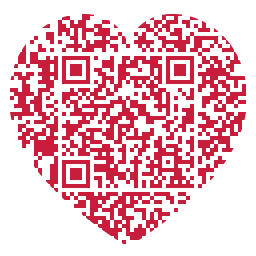
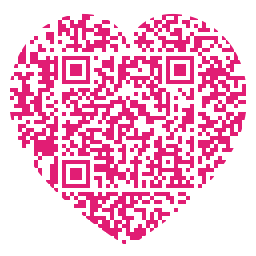
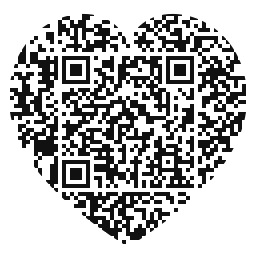
What the Free Heart QR Code Generator Gives You
It is the same generator as the rest of the site with the heart outline switched on, so nothing is held back behind a paid tier. Concretely:
- Free, with no account and no watermark. There is no limit on how many you make and nothing to sign up for.
- Any colour you like, as long as the code stays darker than the background. The contrast meter under the pickers warns you before you download something too pale to scan.
- Error correction raised to H automatically. The heart outline costs the code some area, so the generator compensates without you needing to know the theory.
- Four downloads: PNG for screens, SVG for print, plus EPS and PDF for design work. All vector except the PNG.
- Static codes. Your link is baked into the pattern itself, so it never expires and never depends on this site staying online.
If a heart is not the shape you are after, the same technique produces a circle QR code and a speech bubble QR code.
How to Make a Heart-Shaped QR Code
Four steps, under a minute, completely free.
Open QR Studio and enter your content
Click the button above. Enter a URL, text, contact details. Anything you want the QR code to link to.
Select the Heart style
Scroll to Shape and click Heart. The preview redraws as a heart-shaped code, live, so you see exactly what you are getting before you download.
Pick your colors
Try pink (#ec4899) or red (#ef4444) for Valentine's, or match your brand palette. Keep good contrast with the background, the darker the foreground against the background, the more reliably it scans.
Download free: PNG, SVG, EPS, or PDF
No watermark, no sign-up. Download the format you need: PNG for digital, SVG or EPS for print, PDF for sharing.
Where Heart QR Codes Get Used
Valentine's Day
Link to a message, playlist, or photo album. Print on a card or a gift tag, a QR code beats a printed URL every time.
Weddings
Table cards, invitations, photo walls. Link to your wedding website, RSVP form, or gift registry with a code that fits the aesthetic.
Instagram & social media
Heart QR codes are scroll-stoppers. Use in Stories, Reels thumbnails, or printed merch to drive profile visits or link-in-bio traffic.
Gifts & packaging
Print on gift wrap, bags, or product packaging. Link to a personal video message, a discount code, or a how-to guide.
Florists & gift shops
Attach to bouquets or arrangements. Customers scan to leave a review, browse the shop, or add a digital message for the recipient.
Photo booths & events
Print heart QR codes on event signage to share photo galleries or social handles. They look right at home at parties and celebrations.
Does It Still Scan Reliably?
Yes. QR Studio only applies the heart shape to the three finder patterns, the corner squares that phone cameras use to locate and orient the code. The data modules in the rest of the grid stay standard, so every modern phone camera reads it without issue.
For the best scan reliability: keep the foreground color dark and the background light (or vice versa), avoid printing smaller than 2.5 cm / 1 inch, and leave a quiet zone (white border) around the code. QR Studio generates the quiet zone automatically.
Where People Use These
Two occasions account for most heart QR codes, and each has its own guide here:
- Wedding QR codes for RSVP forms, wedding websites and shared photo albums, plus how to print one that survives the day.
- Valentine's QR codes for playlists, photo albums and video messages hidden inside a card.
Frequently Asked Questions
Yes. The heart style only affects the corner finder patterns, not the data. Every modern smartphone camera: iPhone, Android, Samsung, Google Pixel. Reads it without any special app.
High contrast is key. Dark pink on white, red on cream, or white on deep red all work well. Avoid low-contrast combinations like light pink on white, the camera struggles to distinguish the modules. QR Studio shows a live preview so you can check before downloading.
Yes. Upload your logo in the Logo / Image Overlay section. QR Studio bumps error correction to H (30%) automatically so the code remains scannable with the logo in the centre.
Yes, completely free. No watermark, no account, no limit on downloads. QR Studio is free to use for everyone: download as many heart QR codes as you need in PNG, SVG, EPS, or PDF.
Paste your link, choose Heart under Shape, and pick a colour. The preview redraws as a heart straight away and error correction switches to H on its own. Then download it as PNG for a screen or SVG for print. As a heart QR code maker it needs no account and adds no watermark.
Keep reading
Related pages on QR Studio.
- the wedding versionSame shape, set up for an RSVP or a photo album.
- the Valentine's versionFor a card rather than an invitation.
- add a photo or monogram to the middleA face in the centre of the heart, if it still scans.
- how big that centre image can beWe measured it, so you do not have to guess.
- the circular versionSofter than a square without the romance.